I have been using .NET Aspire on a project for a few months now and I quite like it.
A web application project that I’m working on has grown a lot over the past year. For a developer working from their local machine, they need to launch a few things before being able to start up the web app.
Initially, I solved this by creating a few scripts that take care of this to make the process faster and easier.
Since then, the project grew a lot. It started with a single CMS (Content Management System) called Optimizely (formerly known as EPiServer) and a few other side-services. Now, it needs a second CMS component that communicates with other CMS.
While updating the scripts would solve this, I decided to use .NET Aspire to manage this for me.
With Aspire, a developer working from their local machine can simply use dotnet run or press F5 in their favorite IDE to launch everything needed to run the codebase.
It also helped make the codebase a lot more portable than before by containerizing the dependencies like Microsoft SQL Server and the Vite Dev Servers.
Optimizely CMS requires a connection to a database that contains the content making up the website. Since now it is connected to an SQL Server instance that is running inside Docker or Podman, supplying such a database is not easy.
By default, when the SQL Server docker container starts, it will create an empty database. Optimizely CMS will execute a number of commands on the database to create the required tables and views. But this means the developer has an empty CMS instance on their hands which is not very useful.
It is easy to start up SMSS and connect it to the docker container and import a BacPac file. It is easy, not elegant enough for my taste.
I needed an easier and more elegant way to import BacPac files and, luckily, Aspire supports custom commands.
Custom commands in Aspire allows me to execute custom code against an Aspire resource on demand. I opted to create a command that performs the import when invoked by the developer through the Aspire dashboard.
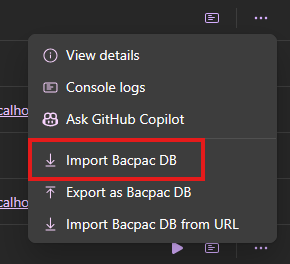
Invoking the command executes the following steps:
- Find a
bacpacfile at.db/db.bacpac - Connect to the Aspire SQL DB Resource
- Drop the existing database if it exists
- Import the
bacpacfile using theDacServicesavailable as part ofMicrosoft.SqlServer.DacFxnuget package. - Notify the user of status through the Aspire dashboard UI helpers.
Implementation
I started with a simple extension method against the IResourceBuilder<SqlServerDatabaseResource> type. The extension method makes it easier to add the command to the resource in the AppHost project:
public static IResourceBuilder<SqlServerDatabaseResource> WithBacpacImportCommand(
        this IResourceBuilder<SqlServerDatabaseResource> target,
        string bacpacFilePathPattern
    )
    {
        // Add all the services required for BacPac import
        target.ApplicationBuilder.Services.TryAddTransient<BacpacImportCommand>();

        return target.WithCommand(
            name: "ImportBacpacDb",
            displayName: "Import Bacpac DB",
            executeCommand: async ctx =>
            {
                try
                {
                    var command = ctx.ServiceProvider.GetRequiredService<BacpacImportCommand>();

                    return await command.ExecuteAsync(
                        bacpacFilePathPattern,
                        target.Resource,
                        ctx.CancellationToken
                    )
                        ? CommandResults.Success()
                        : CommandResults.Failure("Failed to import BacPac file.");
                }
                catch (Exception ex)
                {
                    return CommandResults.Failure(ex);
                }
            },
            commandOptions: new CommandOptions
            {
                Description = "Imports a BacPac file into the SQL Server database resource.",
                IconName = "ArrowDownload",
                IconVariant = IconVariant.Regular,
                ConfirmationMessage =
                    "Are you sure you want to import the BacPac file? This will overwrite the existing database.",
            }
        );
    }
The delegate passed to the executeCommand parameter of the WithCommand extension method is where the magic happen. This delegate will be executed when the user invokes the command via the Aspire dashboard.
I register the BacpacImportCommand class in the service provider as the command class requires some dependencies to be resolved through the DI container. Most of these dependencies are to support providing notifications to the user via the Aspire dashboard.
internal sealed class BacpacImportCommand(
    ResourceLoggerService resourceLogger,
    ResourceNotificationService notificationService,
    IDistributedApplicationEventing eventing,
    IServiceProvider serviceProvider,
    IHostEnvironment hostEnvironment
) : CommandBase(notificationService, eventing, serviceProvider)
{
    private const string ImportingState = "Importing from Bacpac";
    private const string DroppingState = "Dropping existing database";
    private const string DownloadingState = "Downloading bacpac from Url";

    public async Task<bool> ExecuteAsync(
        string dbFileLookupPathPattern,
        SqlServerDatabaseResource targetDatabase,
        CancellationToken cancellationToken = default
    )
    {
        var logger = resourceLogger.GetLogger(targetDatabase);

        if (
            !this.TryGetFileAsync(dbFileLookupPathPattern, out var fullFilePath)
            || fullFilePath is null
        )
        {
            logger.LogError(
                "No BacPac file found matching the pattern '{SourceBacpacFilePath}'. Import aborted.",
                dbFileLookupPathPattern
            );

            await this.NotifyErrorStateAsync(targetDatabase);
            return false;
        }

        logger.LogInformation(
            "Starting BacPac import. Importing '{SourceBacpacFilePath}' into '{TargetDatabaseName}' hosted on '{TargetDbServerName}'...",
            fullFilePath,
            targetDatabase.DatabaseName,
            targetDatabase.Parent.Name
        );
        return await this.InternalExecuteAsync(
            fullFilePath,
            targetDatabase,
            logger,
            cancellationToken
        );
    }

    private async Task<bool> InternalExecuteAsync(
        string fullFilePath,
        SqlServerDatabaseResource targetDatabase,
        ILogger logger,
        CancellationToken cancellationToken
    )
    {
        try
        {
            // begin dropping existing database
            await this.NotifyDroppingStateAsync(targetDatabase);

            if (!await this.DropExistingDatabaseAsync(targetDatabase, cancellationToken))
            {
                logger.LogError(
                    "Failed to drop existing database '{DatabaseName}'. Import aborted.",
                    targetDatabase.DatabaseName
                );

                await this.NotifyErrorStateAsync(targetDatabase);

                return false;
            }

            // begin importing BacPac file
            await this.NotifyImportingStateAsync(targetDatabase);

            if (!await this.ImportBacpacFileAsync(fullFilePath, targetDatabase, cancellationToken))
            {
                logger.LogError(
                    "Failed to import BacPac file '{SourceBacpacFilePath}' into '{TargetDatabaseName}'.",
                    fullFilePath,
                    targetDatabase.DatabaseName
                );

                await this.NotifyErrorStateAsync(targetDatabase);

                return false;
            }

            logger.LogInformation("BacPac import completed successfully.");

            // notify aspire that the import is finished and the database is running again
            await this.NotifyRunningStateAsync(targetDatabase);

            await this.SignalReadyAsync(targetDatabase, cancellationToken);

            return true;
        }
        catch (Exception ex)
        {
            logger.LogError(ex, "An error occurred during BacPac import.");

            await this.NotifyErrorStateAsync(targetDatabase);

            return false;
        }
    }

    private async Task<bool> DropExistingDatabaseAsync(
        SqlServerDatabaseResource targetDatabase,
        CancellationToken cancellationToken
    )
    {
        var logger = resourceLogger.GetLogger(targetDatabase);

        logger.LogInformation(
            "Dropping existing database: '{DatabaseName}'...",
            targetDatabase.DatabaseName
        );

        var connectionString = await targetDatabase.ConnectionStringExpression.GetValueAsync(
            cancellationToken
        );

        await using var sqlConnection = new SqlConnection(connectionString);
        await sqlConnection.OpenAsync(cancellationToken);

        if (sqlConnection.State != ConnectionState.Open)
            throw new Exception("SQL connection is not open.");

        try
        {
            await using var command = sqlConnection.CreateCommand();
            command.CommandText = $"""
                USE master;
                ALTER DATABASE [{targetDatabase.DatabaseName}] SET SINGLE_USER WITH ROLLBACK IMMEDIATE;
                DROP DATABASE [{targetDatabase.DatabaseName}];
                """;

            _ = await command.ExecuteNonQueryAsync(cancellationToken);

            logger.LogInformation(
                "Successfully dropped existing database: {DatabaseName}",
                targetDatabase.DatabaseName
            );

            return true;
        }
        catch (SqlException ex)
        {
            logger.LogError(
                ex,
                "Failed to drop existing database: {DatabaseName}. It may not exist or is in use.",
                targetDatabase.DatabaseName
            );

            return false;
        }
        catch (Exception ex)
        {
            logger.LogError(
                ex,
                "Unexpected error while dropping database: {DatabaseName}",
                targetDatabase.DatabaseName
            );

            return false;
        }
    }

    private async Task<bool> ImportBacpacFileAsync(
        string bacpacFilePath,
        SqlServerDatabaseResource targetDatabase,
        CancellationToken cancellationToken
    )
    {
        var logger = resourceLogger.GetLogger(targetDatabase);

        logger.LogInformation(
            "Importing BacPac file '{BacpacFilePath}' into database '{DatabaseName}'...",
            bacpacFilePath,
            targetDatabase.DatabaseName
        );

        var connectionString = await targetDatabase.ConnectionStringExpression.GetValueAsync(
            cancellationToken
        );

        var dacServices = new DacServices(connectionString);
        dacServices.Message += (_, e) =>
        {
            logger.LogInformation(e.Message.ToString());
        };

        try
        {
            using var bacpac = BacPackage.Load(bacpacFilePath);

            dacServices.ImportBacpac(bacpac, targetDatabase.DatabaseName, cancellationToken);

            return true;
        }
        catch (Exception ex)
        {
            logger.LogError(ex, "Failed to import BacPac file '{BacpacFilePath}'", bacpacFilePath);

            return false;
        }
    }

    private bool TryGetFileAsync(string filePattern, out string? fullFilePath)
    {
        var globber = new Matcher(StringComparison.OrdinalIgnoreCase);

        var matchedFiles = globber
            .AddInclude(filePattern)
            .GetResultsInFullPath(hostEnvironment.ContentRootPath);

        fullFilePath = matchedFiles.FirstOrDefault();

        return fullFilePath is not null && File.Exists(fullFilePath);
    }

    private Task NotifyDroppingStateAsync(IResource resource) =>
        this.NotifyStateAsync(resource, DroppingState, KnownResourceStateStyles.Info);

    private Task NotifyImportingStateAsync(IResource resource) =>
        this.NotifyStateAsync(resource, ImportingState, KnownResourceStateStyles.Info);

}
The important part of this code is what happens in the ImportBacpacFileAsync(...) method. It is responsible for getting the connection string to the Aspire DB resource, initializing the DacServices class and triggering the import process.
The command reports its progress to the Aspire dashboard by simply redirecting the log from DacServices to the Aspire resource logger instance.
This command class also has a few helper methods to report various execution states to the dashboard such as dropping the database and starting the import.
And to use this command in Aspire, I call the extension method I defined above on the DB resource:
var customerCmsDatabase = sqlServer
    .AddDatabase("my-db")
    .WithBacpacImportCommand(@"../../../.db/db.bacpac");
In the screenshot I shared above, there is a second command to export the database back into a bacpac file. The implementation of that command is very similar to this one but that’s also a very helpful command that has come in handy multiple times so far.